Buyer → tray
A completed sale gets a buyer tray. Put the item there and carry on selling.
 LIVE TRAY
Live Tray tracks the buyer, keeps repeat purchases in the same tray, and tells you where each item belongs — on screen or by voice.
Use your computer. Add your phone beside you. Printers and scanners are optional.
Testers highlighted mobile tray guidance, voice callouts, auction timing and repeat-buyer cues.
A completed sale gets a buyer tray. Put the item there and carry on selling.
Repeat purchases stay together during the show. Spot consecutive repeat buys with a yellow cue.
Keep your phone beside you. Voice guidance announces the tray and auction number.
See auction timing when it is available, so you can prepare for the next sold item.
Watch the real Live Tray walkthrough: from the live sale to the tray, packing and the next parcel.
Watch the 55-second quick demo →The embedded YouTube player loads only when you press Play.
Add Live Tray to your Home Screen and use it like an app. See the tray at a glance, or hear “Tray 7. Auction 20.” through your speaker or earbuds.
Keep the Agent running on your computer and your phone’s live view open. Enable voice and check the sound before you start.
Set up your phone companion →Hands on the product.
Tray guidance in your ear.
The buyer and item list are already together. Check each tray, pack the items and keep track of what is ready to ship.
Import a shipping-label PDF in the Agent, review the buyer-to-tray suggestions and save a reordered copy. Unmatched pages stay visible for you to assign or exclude.
See how PDF label sorting works →Work on your computer or take a phone to the packing table. Add packers with the team seats included in your plan.
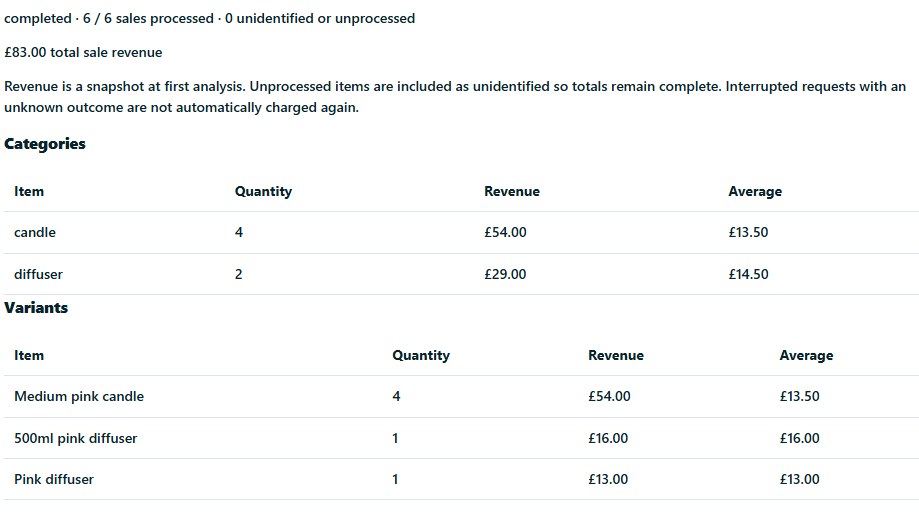
Explore packing →Turn saved sale screenshots into a report of item categories, quantities and revenue after the show.
Explore AI picture analysis →Up to 1,000 AI sales per company per day (UK time), shared across shows. Processing included. Review AI suggestions for mistakes.
No card required. Choose a paid plan when it fits your shows.
Buyer trays, packing and show history.
Start freeMore room for regular shows.
Choose StandardUnlimited sales, advanced analytics and AI picture analysis.
Choose ProTell us what helped and what could be better.
Share your feedback →Yes. Free includes unlimited shows with up to 50 sales per show. No card required. Standard is £15/month for up to 200 sales per show. Pro is £35/month for unlimited sales.
A Windows PC or Mac running the Desktop Agent and your own Whatnot or eBay Live show. You can use trays without a printer or scanner. Add a phone or tablet when it helps.
Yes. Open Live Tray Cloud, choose your live show and enable voice guidance. Keep the page active and your selling computer running. You can use the phone speaker or connected earbuds. Browser audio and screen-awake support vary; the setup guide explains how to check them before a show.
Their purchases stay in the same tray during that show. A yellow visual cue helps you spot consecutive purchases by the same buyer.
Your show stays in history. Open a buyer’s tray, check the items, mark packing progress and record dispatch. You can also prepare a shipping-label PDF in tray order from the Desktop Agent.
Give it a tray. Keep the show moving.
Start freeNo card required · Windows + macOS