Turn your saved sale screenshots into an AI item report after the show. Identify products, group similar items and see quantities and revenue by category.
Enable sale screenshots in the Desktop Agent and choose a folder on your computer. Save an image for each confirmed sale, or capture at bid start and save it when that auction sells.
02 · ANALYSE AFTER THE SHOW
Let AI help identify the items.
Select a completed show and choose Analyse. AI reads the saved images and suggests item categories and visible variants, such as colour or size.
03 · REVIEW YOUR PRODUCT MIX
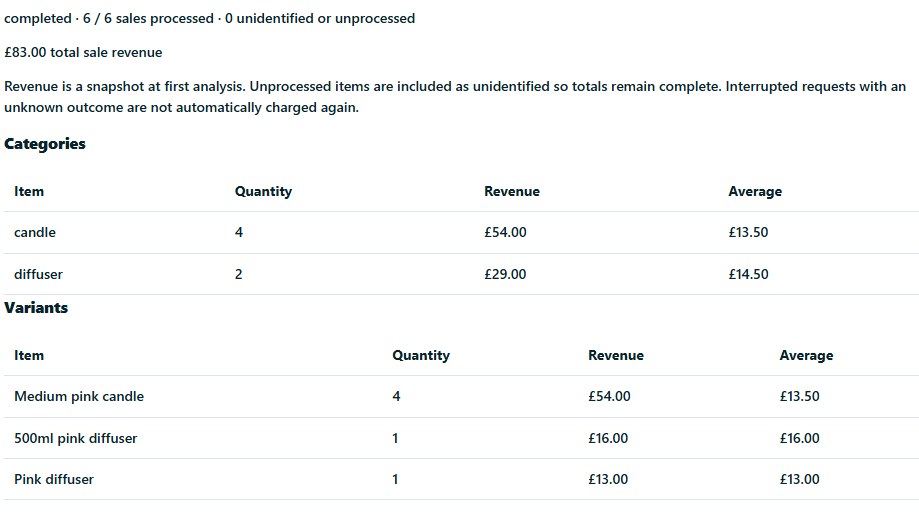
Categories, quantities and revenue.
See what sold by item category and variant, alongside the quantity and sale revenue. Review uncertain or unidentified items; AI results can contain mistakes.
Up to 1,000 AI sales per company workspace per day (UK time), across any number of shows within your allowance. Live Tray covers AI processing — no personal API key needed. Starting analysis reserves all sales in that show, including missing screenshots. The show must fit your remaining allowance. Resuming it does not count the same sales twice. Original screenshots stay on your computer; optimised copies are sent for analysis only when you choose.
Unlimited shows on every plan. Free includes up to 50 sales per show. Standard is £15/month with up to 200 sales per show. Pro is £35/month with unlimited sales and advanced features. Monthly prices include any applicable tax. Paid subscriptions require confirmation in Stripe, renew monthly and can be cancelled through Manage billing. Your saved history remains available when you return to Free.
 LIVE TRAY